Find quick answers about blood pressure measurements, error messages, the BP Doctor App, charging, fit, shipping, returns and warranty.
Choose the right model and understand the basics.
BP Doctor is a blood pressure smartwatch with an inflatable wrist cuff.
When you start a blood pressure measurement, the cuff inflates around your wrist. The watch detects pressure changes caused by your heartbeat and calculates the blood pressure result.
Other health and smartwatch functions vary by model.
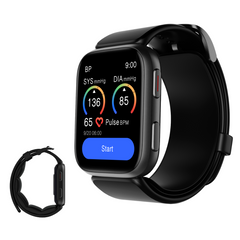
BP Doctor Fit: the core inflatable-cuff BP experience with a large 1.9-inch display.
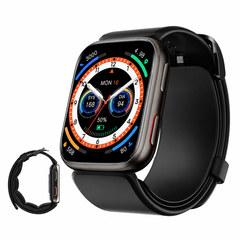
BP Doctor Ultra: a redesigned interface and finish with included Premium App benefits.
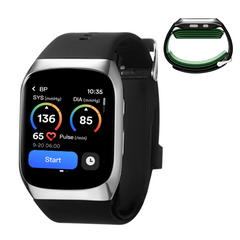
BP Doctor Med: a more blood-pressure-focused model with a dual inflatable cuff design.
No. Blood pressure measurements are on-demand. You start a reading when you want to check your blood pressure.
Some models support measurement reminders, but a reminder is not continuous automatic blood pressure measurement.
Fit / Ultra: approximately 14-22 cm (5.5-8.7 in).
Med: approximately 14-20 cm (5.5-7.8 in).
Do not swim, shower or bathe while wearing a BP Doctor smartwatch.
BP Doctor Med has IP22 protection, but it is not designed for swimming, showering or immersion.
No. Blood pressure readings should be considered together with your overall health information.
Do not use one watch reading by itself to diagnose a condition or change medication. If your readings repeatedly concern you, speak with a qualified healthcare professional.
Correct wearing and posture can make a major difference.
For Fit / Ultra, position the watch approximately two finger-widths from the base of your palm.
Wear it directly on bare skin. The inflatable cuff should sit evenly against the wrist without folding or twisting.
The watch should feel snug and secure during blood pressure measurement.
If the strap is too loose, the cuff may not get a stable pressure signal. If a measurement repeatedly fails, tighten the strap slightly and try again after resting.
For normal daily wear when you are not measuring blood pressure, the strap can be slightly looser.
Wrist height can affect a blood pressure measurement.
Sit comfortably, support your elbow and bring the wrist wearing the watch toward your chest.
Avoid measuring immediately after vigorous exercise, smoking, alcohol, a large meal or strong emotional stress.
Fit / Ultra instructions recommend avoiding vigorous exercise, smoking, drinking and strong emotional changes for around 30 minutes before measurement.
Med instructions recommend resting quietly for at least 15 minutes before measurement.
No. Stay quiet and still until the measurement finishes.
Do not talk, shake your arm, clench your fist, bend your wrist or change your sitting position while the cuff is measuring.
Fit / Ultra: wait approximately 2-3 minutes.
Med: wait at least 3 minutes.
Relax the cuff and stay calm instead of immediately repeating measurements one after another.
Understand normal variation before assuming the watch is faulty.
Blood pressure is not one fixed number. It can change with time of day, exercise, stress, food, alcohol, smoking, temperature, body position, wrist position, talking and movement.
Try to measure under similar conditions and look at your trend over time rather than one reading.
Wrist and upper-arm devices measure blood pressure from different locations. Timing, posture, wrist height and cuff fit can also affect the comparison.
If a large difference continues across repeated correctly performed measurements, contact YHE Support.
Rest, wait a few minutes and measure again correctly.
Fix common measurement failures before contacting support.
This usually means the watch is not receiving a stable signal.
If the problem continues repeatedly, contact Support.
First check whether the watch is inflating and whether the cuff is correctly positioned.
If Code 4 continues, send Support your order number, watch model, SN number and a short video showing the full failed measurement.
If you do not hear or feel any inflation, the watch may require hardware support.
Send Support a short video showing what happens after you press Start.
The watch may not be receiving a stable pressure or pulse signal.
Rest for a few minutes and try again. If the same problem repeats with correct use, contact Support.
Code 1: Weak data signal. Adjust wristband fit and position.
Code 9: Pulse-wave signal could not be captured. Tighten and reposition the watch.
Code 12: Band may be too loose or cuff pressure is unsuitable. Tighten and retry.
Code 21 / 22: Pressure signal is outside the measurement range or affected by position or interference. Check wearing position and remain still.
Code 25: Unstable signal. Stay completely still.
Code 27 / 28 / 29: Abnormal measurement or pressure condition. Adjust the watch, rest and retry.
Code 30 / 31: Poor or unstable pressure signal. Adjust wristband tightness and position.
Download, pair, sync and review your records.
iPhone: BP Doctor.
Android: the current official Google Play link uses Bp Doctor Plus.
Use the official download links provided on the YHE website rather than a similarly named third-party app.
Turn Bluetooth on, open the BP Doctor App and log in.
Confirm the pairing request on the watch when prompted.
The watch should be bound inside the BP Doctor App.
Connecting only through your phone's normal Bluetooth menu may not complete the App setup.
Battery-saving settings on some phones can also restrict App activity in the background.
Yes, but use caution.
Sync important records before unbinding whenever possible.
Open Settings -> Language on the watch and select your preferred language.
If the watch repeatedly changes language by itself after restarting or syncing, contact Support with your model, firmware version and a short video.
Screen, charging, battery and inflatable cuff support.
For magnetic charging models, gently reposition the charging dock until the charging indicator appears.
Battery life varies with BP measurements, display brightness, always-on display, Bluetooth use, notifications, workout tracking and App synchronization.
Fit / Ultra: up to approximately 10 days depending on use.
Med: up to approximately 7 days depending on use.
If a fully charged watch suddenly lasts only a very short time, contact Support.
Do not continue using a visibly damaged inflatable cuff for blood pressure measurements.
Replacement cuff accessories are available for some BP Doctor models. Confirm compatibility with your exact model before ordering.
Fully charge the watch first, restart it and observe whether the problem returns.
If the watch repeatedly restarts, freezes, shuts down or resets settings, contact Support with your SN number and a short video.
Delivery, warranty, returns and contacting YHE.
Delivery time depends on destination and shipping method. Please check the current Shipping Policy for the latest delivery estimates.
Tracking information may take some time to become active after dispatch.
New tracking numbers can take some time before the carrier shows movement.
If tracking has not updated for an unusual period or the estimated delivery window has passed, contact Support with your order number.
Do not discard the packaging.
Please take clear photos of the outer package, shipping label, everything inside the box, product condition and the watch SN number when applicable.
Current BP Doctor watches purchased through the official YHE store include a 12-month limited warranty for eligible defects under normal use.
Damage caused by misuse, unauthorized repair, water exposure, drops or other external causes may not be covered.
Return eligibility depends on purchase timing, reason for return, purchase channel and product condition.
For retailer-specific refunds, cancellations or order issues, contact the retailer where you purchased the product.
YHE Support can still help troubleshoot the device. Have your order information, watch model and SN number ready.
Email: support@yhetechs.com
For faster help, include your order number, watch model and SN number in your first message.
Try a shorter search such as "Code 4", "Bluetooth", "charging", "cuff" or "blood pressure".
Contact Support